Here’s a small annoyance you’ve probably stopped noticing because you’ve worked around it a thousand times. A tool prints something you want to copy (a URL, an API key, a shell command, a block of SQL) and you drag-select it out of the terminal. What lands on your clipboard is mangled: wrapped lines, stray leading spaces, broken indentation. You’re not copying the snippet, you’re copying the reflowed text off the character grid your terminal happened to render it onto.
Ten Four fixes the root cause instead of the symptom. Snippets travel as data, never as rendered terminal text. They’re pushed onto a “shelf” from your terminal (or from Claude Code), and you copy them out of Raycast with the exact bytes that were intended: no wrapping, no leading spaces.
The whole thing is three small parts that compose. None of them is interesting alone; the combination is what I actually use dozens of times a day.
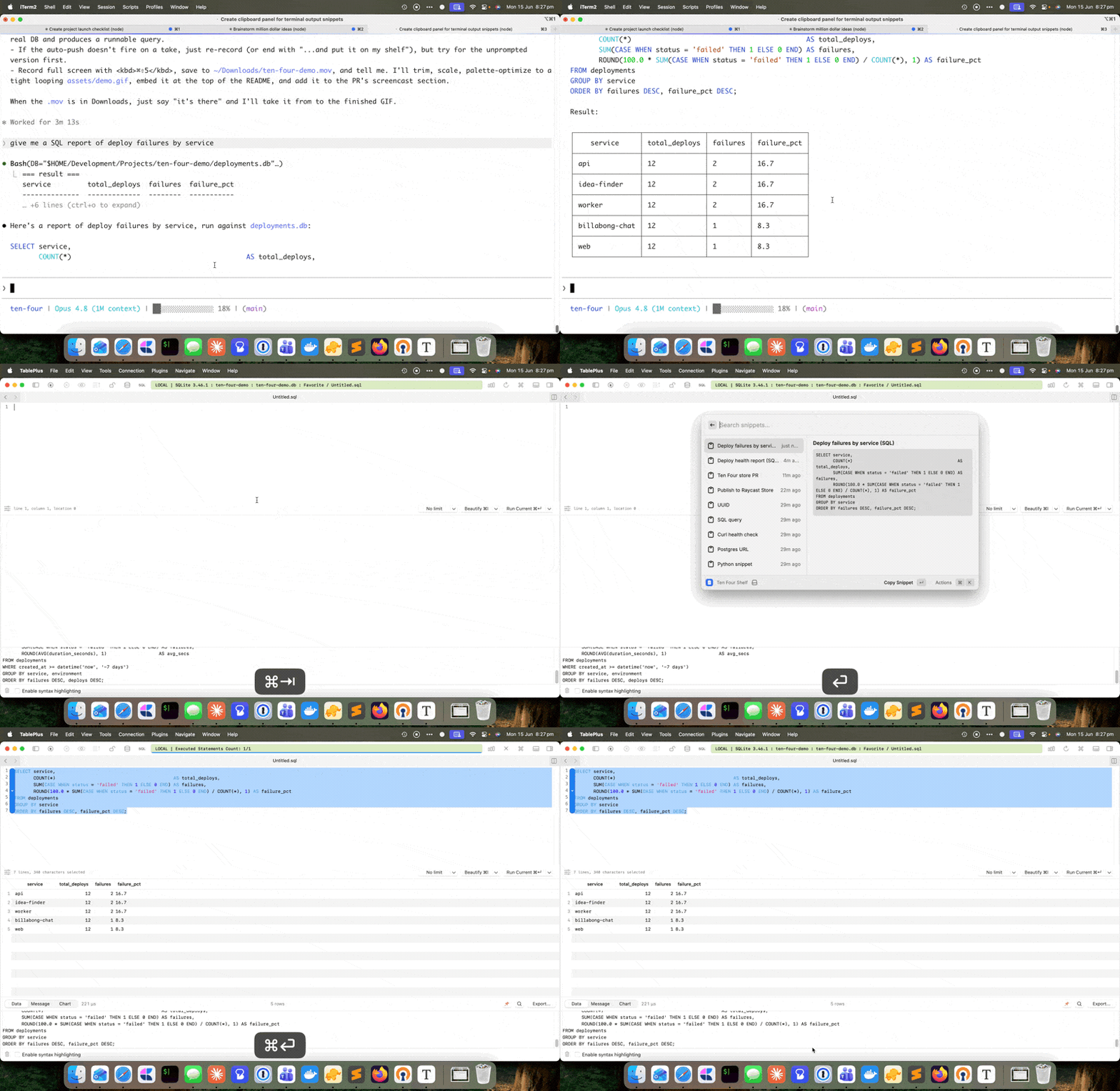
The three parts
your terminal / Claude Code  ──tenfour──▶  ~/.ten-four.json  ──▶  Raycast "Ten Four"
        (writer)                            (the shelf)              (reader)
The CLI (tenfour). A tiny, zero-dependency Node script that appends a snippet to a shelf file (~/.ten-four.json). That’s all it does. tenfour "https://my-app.up.railway.app" uses the first line as the label; tenfour --label "API key" "sk-live-…" sets it explicitly; piping in via stdin handles multiline text. The shelf keeps the most recent 200 snippets and never trims pinned ones.
The Raycast extension (the reader). A searchable list of the shelf. Hit the Raycast hotkey, type a letter or two, press ↵ to copy or ⌘↵ to paste straight into the front app. Because the snippet was stored as data, what you paste is pristine.
The Claude Code hook (the automatic writer). This is the part I didn’t expect to lean on as hard as I do. I added a Stop hook to my global Claude Code config so that whenever Claude produces a snippet I’m likely to want, it lands on the shelf on its own, with no copy step at all.
Why the hook needs a sentinel, not a CLI call
The obvious way to wire Claude into this is to tell it, in CLAUDE.md, to run tenfour --label … "…" whenever it outputs something copyable. That works, but it’s fragile in two ways: the model has to remember to do it every time, and the snippet then exists twice in the transcript: once in the visible message, once in the tool call.
The version I actually run inverts it. Claude wraps any copyable snippet in an invisible HTML-comment sentinel:
<!--shelf:Short Label-->
the exact text to copy
<!--/shelf-->
The comment markers render as nothing in the terminal, so I still see a clean snippet on screen. A Stop hook then scrapes the finished turn, finds the marked blocks, and pushes them to the shelf. The reliability win is the point: a hook fires deterministically on every turn, where “remember to call the CLI” is a coin-flip the model loses often enough to matter.
Two implementation details turned out to be load-bearing, and both are the kind of thing you only discover by running it daily:
Dedup by content hash. The Stop hook can fire more than once for a turn, and the scraper re-reads the whole transcript each time. Without dedup, a single snippet gets pushed two or three times. A content-hash log (sha256(label + body)) makes re-scans idempotent: already-pushed snippets are silently skipped.
Scan the whole transcript, not just the last message. My first version only looked at the final assistant block. But a snippet is usually emitted mid-turn, followed by more tool calls and a closing summary, so the marker rarely sits in the last block. The fix is to scrape sentinels from every assistant text block in the turn; the content-hash dedup is what makes that whole-transcript re-scan safe to do on every fire.
There’s also a smaller, nastier bug hiding in the timing. When the Stop hook fires, the turn’s final assistant block often isn’t written to the transcript file yet. A naive scan reads everything except the message just shown on screen, so the sentinel-bearing block gets scraped one turn late, or never if there’s no next turn. The hook waits for the transcript file to stop growing (capped well under the hook timeout) before scanning, and the hash dedup keeps a slightly-late read harmless.
Why a shelf and not the clipboard
The natural objection: why not just have Claude put the snippet on the clipboard directly? Because the clipboard is a single slot with no memory and no labels. A turn often produces several things worth keeping: a URL and a command and a token. The shelf holds all of them, named, until I want them, and it survives across turns and sessions. The clipboard can’t be a list; the shelf is one by design.
The same reasoning is why the writer and reader are decoupled through a file rather than talking directly. The CLI doesn’t know or care that Raycast exists; Raycast doesn’t know snippets sometimes come from an AI. ~/.ten-four.json is the entire contract between them, which means anything that can append JSON can be a writer (a shell script, a cron job, a different editor’s hook) without Ten Four knowing about it.
What it’s like to use
The honest answer to “is a tool for copying snippets worth building” is that I didn’t think so either, until the Claude Code hook turned it from a manual convenience into something ambient. Claude answers a question, and the SQL query, the railway command, the generated API key are just there on the shelf when I reach for them, formatted exactly right, every time. The annoyance I’d stopped noticing turns out to have been a small tax on every single thing I copied. Ten Four removed it.
The name is a CB-radio joke. “10-4, copy that.” It pushes things you want to copy. That’s the whole gag.
Ten Four is open source (berwickgeek/ten-four) and on its way to the Raycast Store. If you live in a terminal and a launcher, it might remove a tax you’ve also stopped noticing.