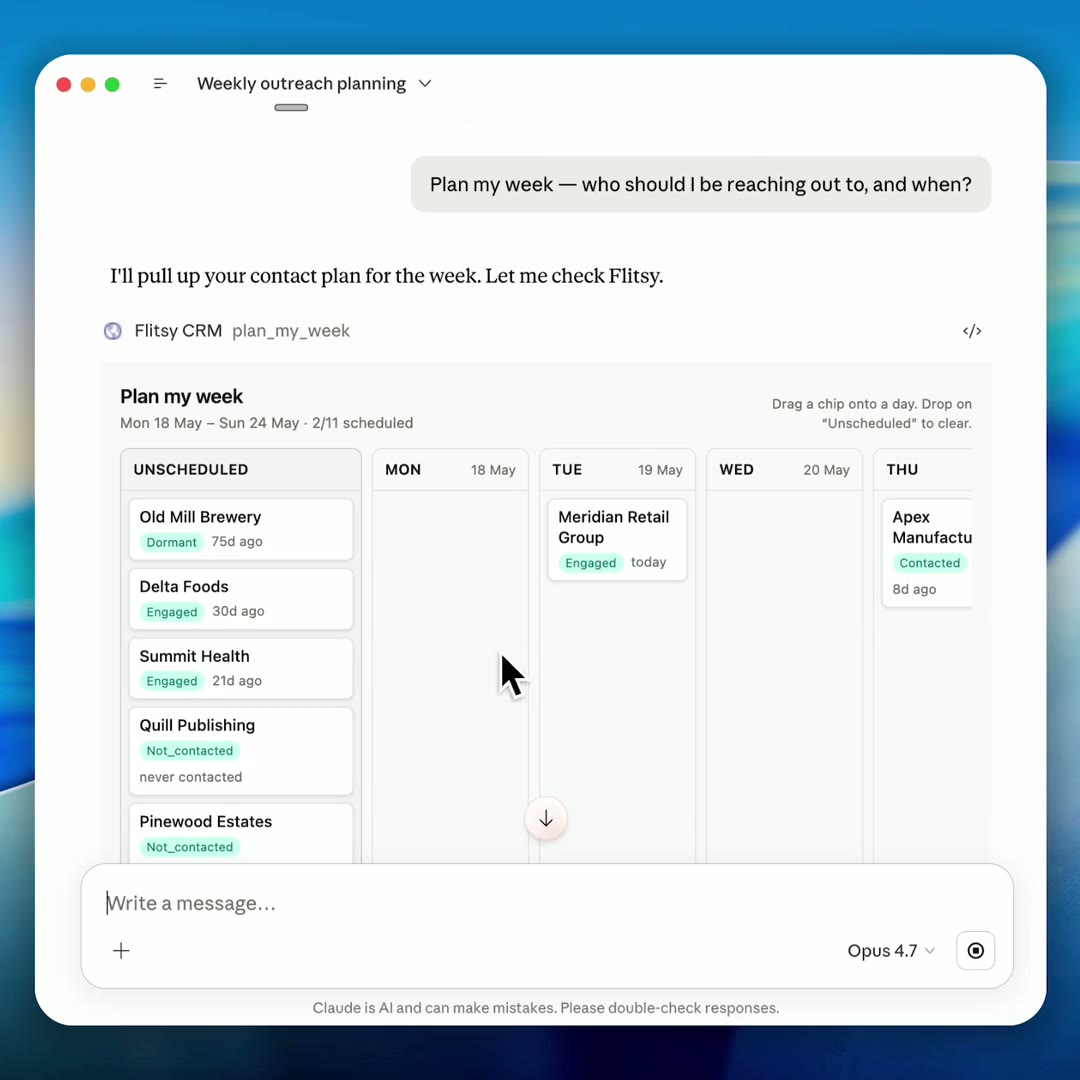
flitsy is a CRM you never open. Instead of another web app with seven tabs, you connect it to Claude (or any Model Context Protocol client) and just ask. The AI reads your pipeline, drafts replies in your tone, and chases the follow-ups. You stay in the chat you were already in.
This is the inverse of “a CRM with an AI button bolted on.” There’s no CRM screen to look at, because the AI is the screen.
Visit flitsy.appWorks with anything that speaks MCP: Claude, ChatGPT, Cursor, Zed. About five minutes to set up.
How it works
- Spin up a dataset and add its MCP URL to your AI client (
https://your-host/mcp/<dataset-slug>). - Sign in once through the client’s OAuth flow, and flitsy registers itself automatically.
- Ask. “What’s stalled in my pipeline?” “Draft a check-in for Acme.” “What’s my week look like?” The AI calls flitsy’s tools, reads your data, and does the work.
Nothing leaves your inbox until you hit Send. The AI drafts; you review and edit; you decide what goes out.
MCP-first, by design
Every piece of your data is exposed to the AI across three MCP surfaces:
- Tools:
list_organisations,log_interaction,search_notes,next_best_action,bulk_update_status,get_inbound_email,undo_last_action, and dozens more. These are the verbs the AI uses to read and change your data. - Prompts: slash-style commands the AI offers you, like
/morning_review,/draft_followup,/triage_unmatched_senders,/find_warm_intro,/weekly_review, and/setup_voice. - Resources: addressable URIs like
crm://orgs,crm://inbox, andcrm://digest/todaythat you can attach as conversation context with@.
Features
- Reads your pipeline and tells you what’s next. Smart views like follow-ups due, inbound awaiting reply, and next best action surface what needs attention without you building a single report.
- Drafts in your voice. Per-dataset voice and signature facts are fed to the AI, so check-ins match the tone of your last thread with that contact, not a generic template.
- Email that auto-logs. Each dataset gets its own inbound address (
cr-<token>@in.flitsy.app). Forward an email and it’s logged as an interaction, with the sender matched to the right person. - Semantic note search. Notes are embedded with Cohere
embed-v4.0and stored in pgvector, so “find that conversation about pricing” actually finds it. - Interactive widgets in the chat. Plan a week by dragging accounts onto days, review a pipeline table, or preview a draft, all rendered right inside the conversation.
- Multi-tenant and isolated. One account, many datasets, each with its own MCP URL, OAuth flow, inbound address, statuses, and interaction types. Add the server several times with different slugs to switch between them.
Why an MCP-first CRM?
Traditional CRMs are where data goes to be forgotten: a separate place you have to remember to open, update, and check. flitsy puts the CRM where you already are, in the AI chat you’re using to write the email, plan the week, and think through the deal. The data stays structured and queryable, but you never context-switch into a CRM UI to touch it. The AI does the reading, writing, searching, and chasing on your behalf.
FAQ
Is there a web app or dashboard I log into? No, and that’s the point. You interact with flitsy entirely through your AI client’s chat. A small admin UI exists only for setup (creating datasets, inviting members, billing), not for day-to-day CRM work.
Which AI clients does it work with? Anything that speaks the Model Context Protocol, including Claude, ChatGPT, Cursor, and Zed. You add flitsy’s MCP URL and authenticate once.
Can the AI send emails on my behalf without me seeing them? No. flitsy drafts messages and shows them to you for review; nothing is sent until you approve it.
Does it send text messages or make phone calls? No. flitsy can send email when a mailbox is connected, but it doesn’t do SMS or calls. It’ll happily draft the text or talking points for you to send yourself.
How does the email logging work? Each dataset has a unique inbound address. Forward (or auto-forward) an email to it and flitsy logs it as an interaction, matching the sender to an existing person where it can.